Design visually
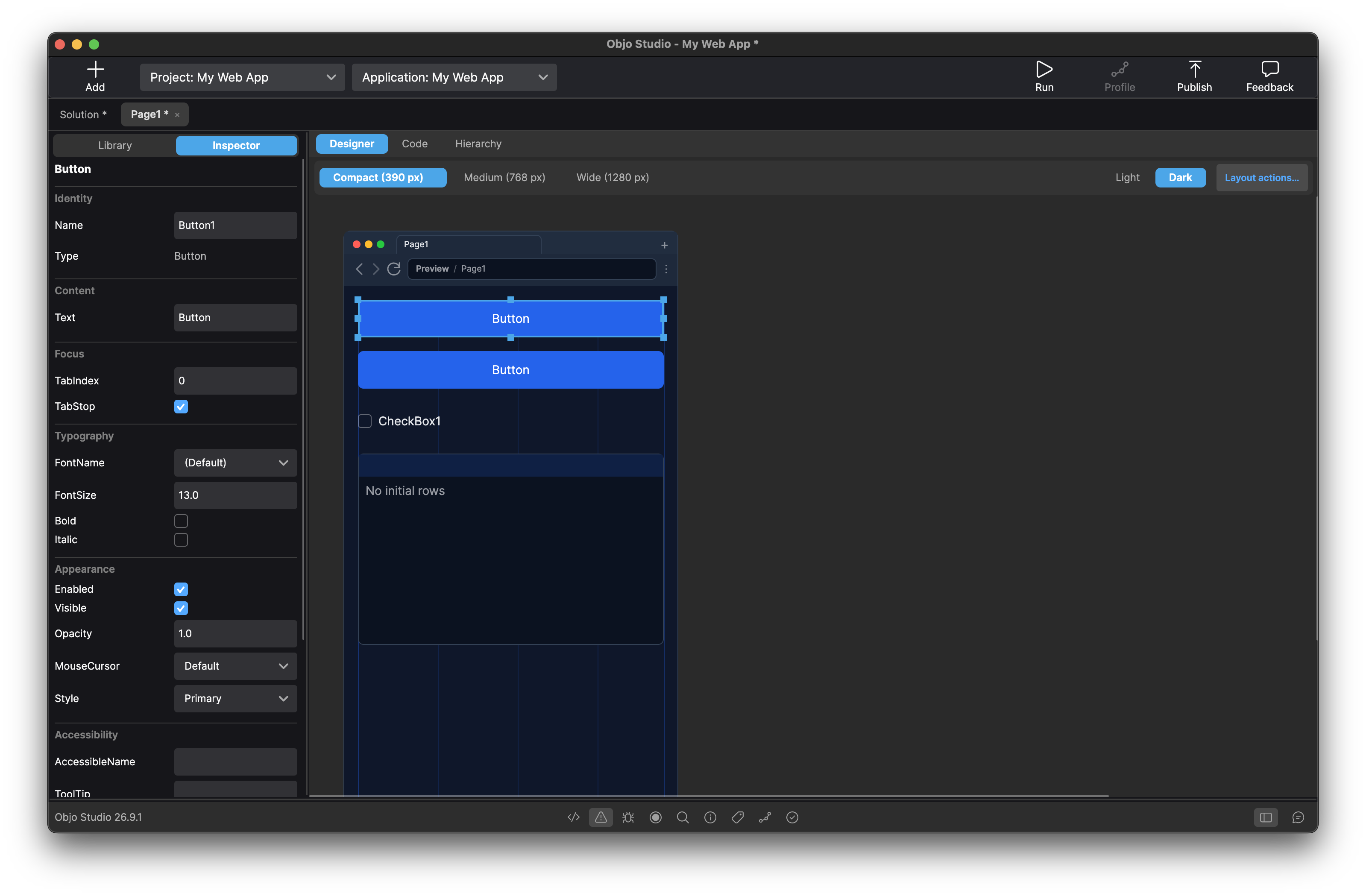
Drag controls onto desktop windows or responsive web pages. Edit properties in the Inspector, anchor desktop layouts and arrange web layouts at three breakpoints.
A visual RAD tool for PC SOFT developers
Meet Objo Studio: a modern IDE with visual designers for desktop windows and responsive web pages, readable statically typed code, and desktop, web and command line projects in one solution.
Runs on and builds for every major desktop
Desktop and web in the same IDE
Build customer portals, internal tools and data dashboards with a responsive visual designer. Arrange each page at Compact, Medium and Wide breakpoints, then connect forms, searchable lists, charts and custom canvas drawing to your Objo code. Built-in controls need no HTML, CSS or JavaScript.
Run the app in your browser and debug server-side events in Studio. When you are ready to ship, Publish creates one self-contained server executable for your chosen platform. Your users open a link; your server needs no separate .NET runtime. You choose and manage the hosting.
Explore web app features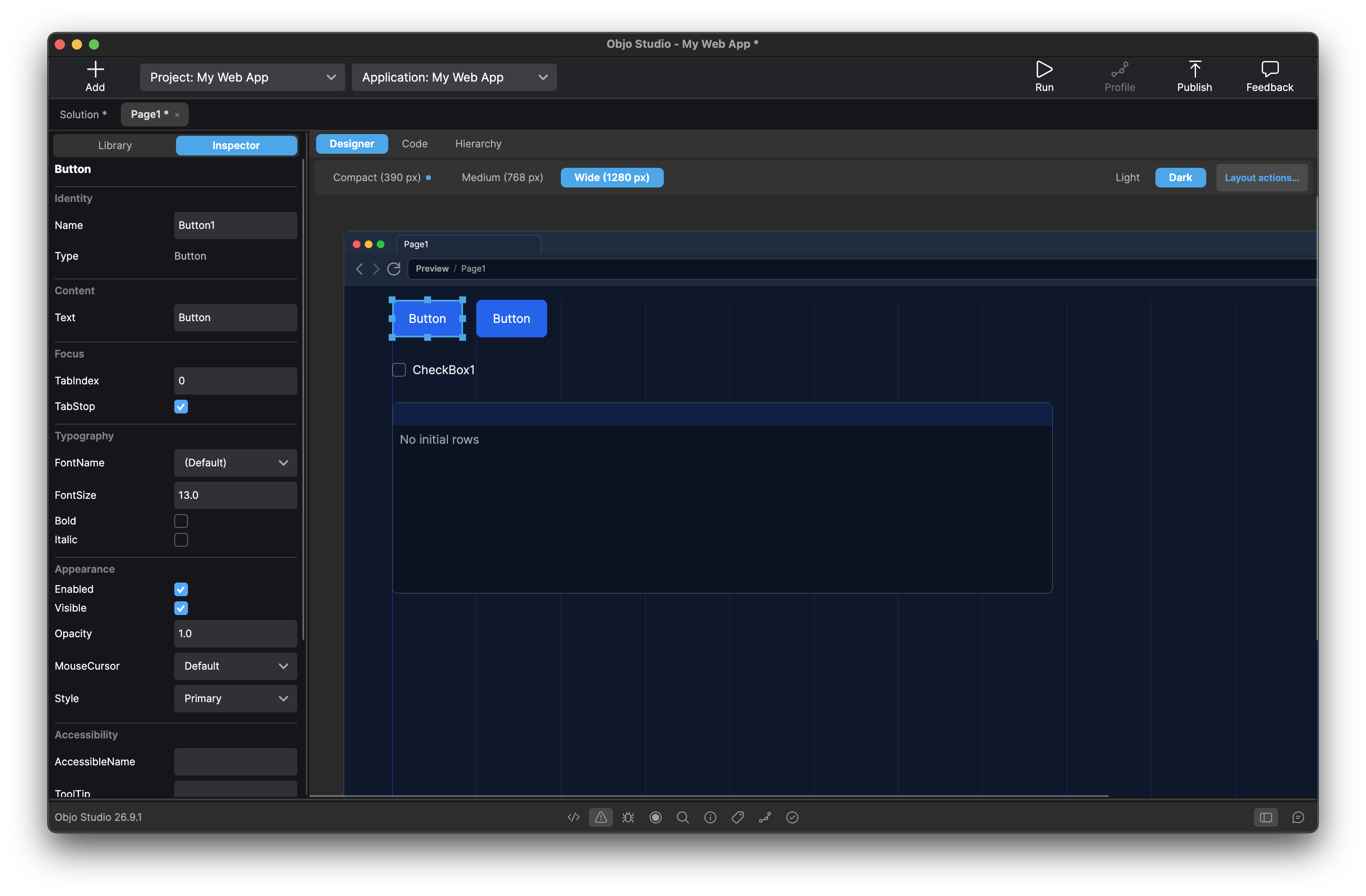
A familiar way to work
Keep the integrated workflow WINDEV developers value: lay out a window or web page, write event-driven code, work with databases and debug in one focused environment. Objo Studio brings that approach to desktop and browser apps with a modern language and straightforward licensing.
Drag controls onto desktop windows or responsive web pages. Edit properties in the Inspector, anchor desktop layouts and arrange web layouts at three breakpoints.
Use a modern, statically typed, object-oriented language that is familiar but improved.
Set conditional breakpoints, use watchpoints, step through code and inspect variables. Debug server-side web events locally in Studio, or debug desktop and command line apps on remote machines.
Build standalone desktop and command line applications for every supported target from any supported development OS. Publish web apps as self-contained server executables.
See changes, commit selected solution items and create or switch local branches with Studio's bundled Git integration.
Use SQLite, MySQL, PostgreSQL, SQL Server or ODBC through a consistent database API.
Keep data models, validation and business rules in Shared Code. Use them across Desktop, Web and Command Line projects in the same solution, with APIs available to each target.
Run unit tests for Desktop, Command Line and Worker projects in Studio or CI with JUnit reports. Use the licensed profiler to find bottlenecks in desktop and command line apps.
Desktop and Command Line apps can use Worker projects for isolated jobs across multiple processor cores. Workers stay separate processes when you run, debug and ship.
At a glance
If your shortlist starts with visual design, readable code and genuine cross-platform reach, Objo Studio is built around the same priorities.
Explore every feature| What you need | What Objo Studio gives you |
|---|---|
| Visual UI design | Desktop window and responsive web page designers |
| Familiar syntax | A readable statically typed language without semicolons or curly braces |
| Database access | SQLite, MySQL/MariaDB, PostgreSQL, SQL Server and ODBC |
| Desktop targets | macOS, Windows and Linux |
| Web apps | Responsive browser interfaces with server-side Objo code |
| Shared code | Common business logic across projects in one solution |
| Cross-compilation | Target any supported OS from any supported OS |
| Simple delivery | Standalone apps with no separate runtime needed |
| AI and automation | Optional built-in assistant and external coding agents through MCP |
| Try before buying | Design, code, test and debug for free |
Readable from day one
Objo is designed to be readable to developers coming from visual RAD tools. Clear If, Then, Else and End If branches sit alongside static typing, classes, interfaces, events, async/await and modern collections. The syntax is different from WLanguage, but the IDE handles much of the scaffolding for you.
Meet the Objo languageAn honest statement
I built Objo Studio because I still love the promise of rapid application development: designing an interface visually, writing approachable code and turning an idea into a working app quickly. But I had grown frustrated with long-standing bugs and increasingly longed for the modern language and IDE features that legacy tools were missing.
I did not want to abandon visual design. I wanted a modern version of it. Objo Studio is the tool I wanted to use: fast, visual and approachable, with a modern language and an IDE built for creating cross-platform desktop apps today. — Dr Garry Pettet
From the Objo community
Real experiences from people building software with Objo Studio.
I have been developing software for Windows and Mac for years... Objo does live up to this promise through a smart architecture and a well implemented framework. It is a product in development but it already has a rich feature set that grows daily. Due to the absolute dedication of the developer, bugs are fixed almost immediately and new and meaningful features are added with each release. In addition, interacting with the developer is a very fun and exciting process.
I love Objo. It’s great to hold a brand-new RAD tool in my hands. I never would've imagined that in 2026 a new BASIC dialect would surprise me so much and reignite my curiosity.
I've long wanted a RAD environment with a comprehensive programming language that would really deliver on its cross-platform claims without being fragile or expensive. Objo Studio finally checks all those boxes -- and best of all, it's clearly a labor of love by an incredibly competent software architect. The vendor both believes in and consistently delivers on great customer service, as well as rapid progress on an impressive product roadmap. Participating in testing and evaluating Objo Studio has been such a positive and appreciated experience in a world full of mediocrity.
Straightforward licensing
If changing subscription terms brought you here, Objo's model is intentionally predictable. Explore for free, then use one £129 licence for desktop, web and command line apps, including 12 months of updates. Every version released during your licence stays yours to use, even if you choose not to renew.
Questions before you try?
No. Objo Studio does not import WINDEV projects or WLanguage code. It is a separate IDE and language, so an existing application must be recreated and its code adapted.
Objo Studio supports responsive web apps alongside desktop and command line applications. You can build browser-based tools with its Web target, but it does not import WEBDEV projects or target native iOS or Android applications. Explore web app features.
Yes. Design pages at Compact, Medium and Wide breakpoints, use built-in controls and write their behaviour in Objo. Run the app in your local browser and debug its server-side code for free. Publish creates a self-contained server executable and is included in the same license as desktop and command line builds.
Publish for your chosen server platform, then run the executable on your own computer or hosting provider. Studio can generate a deployment kit, but hosting is arranged separately and publishing does not upload your app. Configure HTTPS and the server for your deployment. Read the web app guide.
Debug server-side web events locally in Studio with one browser session per Debug run. Web project unit tests, profiling, remote debugging and Worker pools are not currently supported. Pages use the built-in controls; arbitrary HTML, CSS, JavaScript and custom Web controls are not supported. See the Web target documentation.
Develop on Apple Silicon Macs, Windows or Linux and target macOS Apple Silicon and Intel, Windows x64 and ARM, and Linux x64 and ARM. Web apps run on your chosen server platform and users access them through a browser.
You can design, write, run and debug desktop, web and command line projects for as long as you like. Unit testing is also free for supported project types. A license unlocks desktop and command line profiling, builds and publishing, plus web publishing. There are no royalties or automatic renewal charges; keep using versions released during your license period and renew when you want newer versions.
No. Objo Studio is an independent product built by Pettet Industries Ltd and is not affiliated with or endorsed by PC SOFT.
Your next app can start here
Download it free, open the visual designer and build a small idea before you decide.
Download Objo Studio Available for macOS, Windows and Linux.WINDEV, WEBDEV and WINDEV Mobile are trademarks of PC SOFT. Objo Studio is not affiliated with or endorsed by PC SOFT.